
Just Keep Fishing Controls
Keyboard and mouse for walking, casting, selling, and the GO FISH! skill tree.
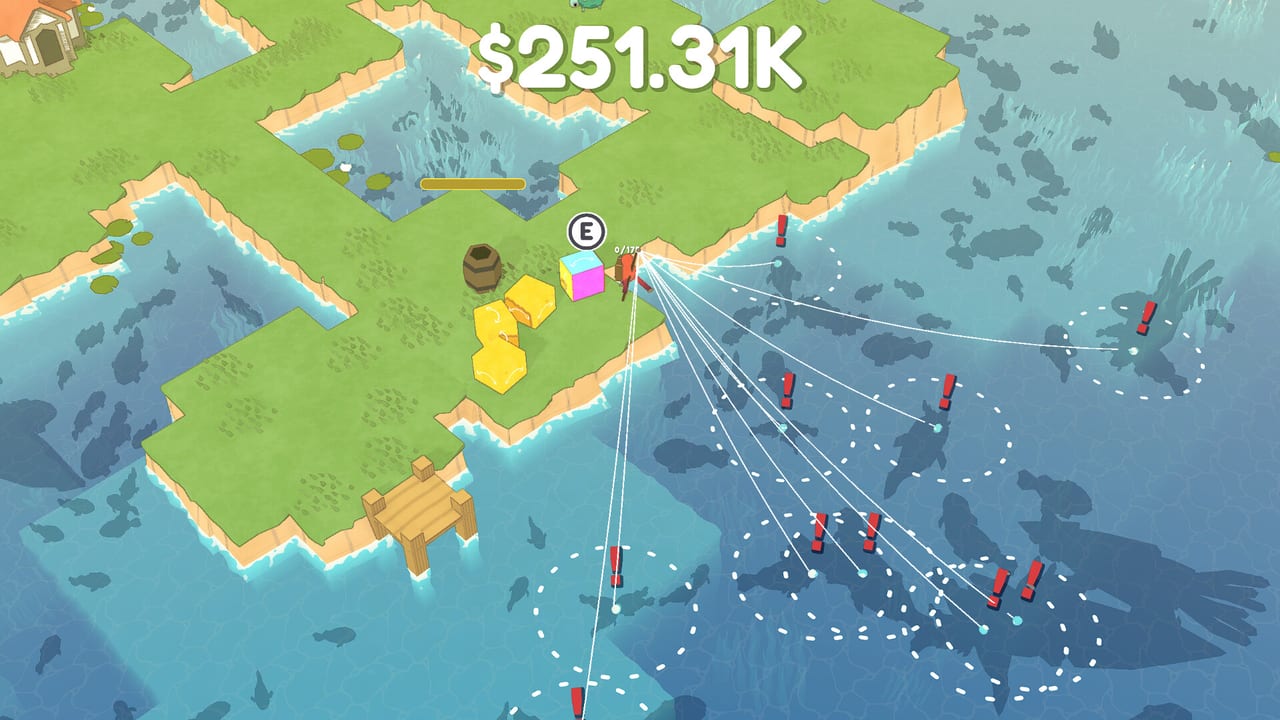
Just Keep Fishing is a mouse-and-keyboard incremental on Windows 10 or later and macOS Ventura or later. There is no official public dump of every bind. What follows is the set players actually use on the starter tropical island and can confirm in-game. If a prompt on your build disagrees with this page, trust the prompt. This wiki will not invent a gamepad layout, a Steam Deck click-track, or extra keys that never appear on screen.
If you have not sold a fish yet, read Getting Started first so these binds have a loop to sit in. The Island Walkthrough is the route once logs unlock the boat. Guides Hub lists the rest of the how-tos.
Move, look, and jump
WASD walks the fox. The camera is top-down, so forward is toward the top of the screen unless you have rotated nothing — there is no separate look stick. Strafe around the hut, the barrel, and the shoreline rather than holding one key across the whole island. Movement speed is an upgrade later; on hour one the fox is deliberately slow so the backpack walk is part of the economy.
Jump exists. Use it to hop short ledges, wood piles, and awkward bank geometry. This page will not assign jump to a key that Steam has not printed in a screenshot. If you need the bind, open the in-game prompt or pause overlay and read it there. Do not assume Space is jump. Space is already the fishing / skill-tree toggle.
Cast, wait, bite, click
The mouse aims the cast. Point at water, cast, and watch the bobber. In the demo, holding the cast sent the line farther; that longer press is still the way to reach fish off a short dock. Early on, a short tap into nearby water is better than a hero cast into empty ocean. Schools sit in the pond. You are not sniping a horizon.
A dashed circle around the bobber is the catch zone. Fish that swim into that circle can bite. A bite is not a splash you imagine — it is a red exclamation mark on the bobber. Click when you see that mark. Clicking early yanks an empty line. Clicking late misses the window. There is no separate reel minigame with a tension bar in the sense of a sim; the skill is watching the float and clicking on the !.
Lure / attraction range is an upgrade that grows that dashed circle. Max fish per bobber is a different node (late screenshots show Currently: 10, next +5 for $2.5B). Neither node changes the click itself. They change how many bodies can be on the line when you click. Magnets, extra lines, and extra fishermen stack on top of the same click. You still aim, you still wait, you still hit the red mark.
Several lines in the water
Screenshots show four to ten bobbers out at once once you have bought extra rods / lines. Each bobber is its own dashed circle and its own red !. The mouse still aims new casts. You can park multiple lines along a bank and walk the fox between them, or stack them in a dense school. The HUD does not catch for you until extra fishermen are bought; those NPCs are an upgrade, not a second bind. Your job remains: see the !, click, empty the backpack at the barrel.
If a bobber sits in a dead patch, recast. There is no dedicated “recall all” key this wiki can print. Walk, recast, or wait. Fish density and fish-type nodes change what swims into the circle. They do not add keyboard chords.
Sell, interact, crates, and the barrel
E is sell / interact. Walk to the barrel with fish in the backpack and press E to turn them into coins. The coin HUD sits at the top of the screen. Early sales may read around $7. That is not a broken bind. Mid-run dumps at $248–$251K, lava figures like $11.41M, and late $99.24B / $124.13B / $34.21T numbers are sell-value upgrades and better fish, not a different button.
E is also the interact you use on world objects that want a prompt — including yellow delivery crates on islands. Reviewers say those deliveries get overpowered fast. Walk up, press E, take the payout. If E does nothing, you are out of range, the bag is empty (for a sell), or that object is scenery. The hut is a landmark. Gold piles and crystals on later islands are layout, not extra undocumented keys.
Space, GO FISH!, and the skill tree
Space toggles the fishing island and the skill tree. The tree is a blue node map. Buy backpack size, cast distance, lure range, extra lines, magnets, movement speed, sell value, extra fishermen, and fish density / types from those nodes. When you are done browsing, Space or the GO FISH! prompt returns you to the fox.
Mouse-wheel zoom on the skill tree is unlimited. The developers left that zoom in as a joke. You can dive through the map into nonsense scale or pull back until the whole tree is a postage stamp. If you have “lost” the nodes, scroll the opposite way. There is no reset-zoom key this wiki will invent. Click nodes to buy them when you can afford them. If a node is grey, you lack coins or a prerequisite — fish more, sell at the barrel, come back.
Do not bind Space to jump in your head. If you mash Space on the island, you will open the tree in the middle of a bite window and miss the red !.
What this page will not invent
No full official binding table has been published. Confirm extras in-game. This page will not list controller faces, gyro, touch pads, or a made-up Steam Input template. Steam Deck players exist, and one Deck bug was fixed quickly through Discord; that is a support note, not a bind list. If you play on Deck, use whatever keyboard emulation or official layout the build offers, then match it to WASD, mouse click, E, and Space as named above.
Linux is not listed as an official Steam platform flag. Official pages name Windows and macOS. Play on those, or accept that an unofficial stack is on you to bind.
Small drones or planes that appear on mid-game islands are world dressing in screenshots. They are not a vehicle bind. Penguin Kicker between some islands is a short timed minigame with penguins, a chest, and coins — play the prompts on that screen rather than assuming the fishing binds all carry over. The turtle that swims on island 1 is caught with the same cast-and-click loop later, not with a unique turtle key; see How to Catch the Turtle when you are ready.
Practice the loop, then leave this page
A useful five-minute drill: WASD to the bank, short cast, wait for the dashed circle to fill, click the red !, walk to the barrel, E, Space into the tree, buy backpack size if you can, Space back, repeat. When that is automatic, you do not need this page. Spend time in Getting Started and the Island Walkthrough. Rank fish on the fish tier list and plan nodes with the upgrade planner. Hardware questions belong on system requirements and Tools. Patches sit on the Updates Hub. Store, Discord, and developer support sit on Links.
Frequently Asked Questions
Quick answers on islands, upgrades, the turtle, and launch week.
What are the core keyboard binds?
WASD moves. Mouse aims, casts, and clicks bites. Click when a red ! sits on the bobber. E sells at the barrel and interacts. Space toggles the GO FISH! skill tree. Jump exists; confirm that bind in-game.
How do I know a fish is biting?
Fish must be in the dashed circle. A bite shows as a red exclamation on the bobber. Click then, not before. Holding a cast farther (as in the demo) only changes where the circle lands.
How do I leave the skill tree?
Press Space or use the GO FISH! prompt. The tree is a blue node map with joke-unlimited mouse-wheel zoom. Scroll if you have zoomed through the floor.
Is there an official gamepad map?
No public full binding dump exists. This page will not invent one. Confirm leftover keys in-game. Steam Deck players exist; match whatever layout your build offers to WASD, click, E, and Space.
Why is E doing nothing?
You are not close enough to the barrel or crate, or the backpack is empty. Walk into the prompt range and try again. Selling is E at the barrel, not a click on the HUD.