
Just Keep Fishing Planner and Platform Tools
Spend coins in the right order, then confirm Windows, macOS, or Deck can actually run the session.
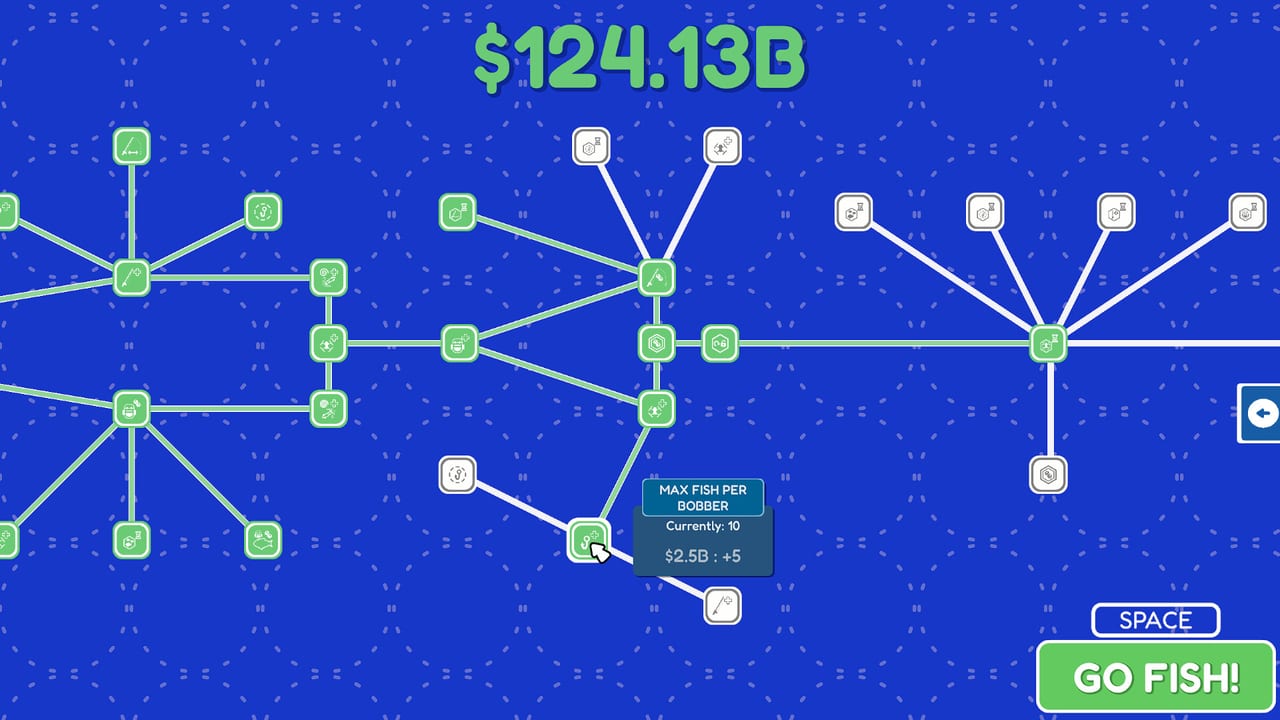
This hub holds the two working pages you open when you are about to play Just Keep Fishing, not when you want a story recap. One is a static spend-order planner for coins. The other is a platform checklist built from Steam’s Windows and macOS minimums, plus honest notes on Deck and Linux. Use them before you dump a haul into the wrong node, or before you install on a machine that never met the spec.
Just Keep Fishing is a short incremental about catching a lot of fish, selling them at the barrel, and buying upgrades until the numbers get silly. Set Sail Games shipped the full build on 27 Aug 2026. The loop is still the same: press Space for GO FISH!, land bobbers, fill the backpack, walk to the barrel, spend coins, repeat. The tools here do not replace that loop. They stop you from wasting the coins the loop produces.
The two tools
Upgrade spend-order planner is a priority list, not a JavaScript calculator. It tells you to grow the backpack until you stop walking to the barrel every two fish, then raise fish per bobber, then buy extra rods, then stretch cast distance and lure range so bobbers actually find fish, then pick up magnets and sell value, then treat movement speed and extra fishermen as comfort. Vanity is last on purpose. Late nodes climb into the billions; one listed bump is $2.5B for +5 fish per bobber when you are sitting on $124B. The planner exists so that sticker does not panic you into buying hats.
System requirements checklist is the platform page. Steam lists Windows 10 or later (Intel Core i3 2.00 GHz or AMD equivalent, 4 GB RAM, Nvidia GeForce GTX 950 or higher, 500 MB) and macOS Ventura or later (M1 or Intel equivalent, 4 GB RAM, 500 MB). Linux requirements exist in the API dump, but platforms.linux is false, so Linux is not an official store platform. One Arch Linux Steam reviewer still played. Steam Deck players reported it works; a launch bug was patched quickly through Discord. The install is about 500 MB and the session is short, which is the point of the game.
Open the planner when you have coins and no idea what the next rank should be. Open the checklist when you are installing on a laptop, a Mac, or a Deck and want the official numbers in one place. You can run both in the same evening. Neither page needs a save file.
How these sit next to guides and the tier list
The planner answers order. The upgrade tier list answers which node is actually good. The how to make money fast guide answers how to feed the shop. The getting started page answers what the first ten minutes look like. The fish tier list answers what is worth targeting once you can reach it. This hub does not reprint those pages. It points at them so you do not treat a spend order as a species ranking, or a spec sheet as a walkthrough.
If you are brand new, read getting started first, then come back here before the second shop visit. If you already know the barrel, skip straight to the upgrade planner. If you only want to know whether a 2016 GPU will boot the thing, stay on the system requirements page and ignore the coin math.
The Guides Hub still owns controls, the island walkthrough, the turtle, achievements, and the review. The Tier List Hub still owns rankings. The Updates Hub still owns the 10 Jun 2026 demo and the 27 Aug 2026 launch. Tools are the two practical sheets that sit beside those hubs.
What these pages are not
They are not live patch feeds. They are not an in-game overlay. They are not a spreadsheet you paste saves into. The planner will not read your coin total. The spec page will not benchmark your laptop. Both are written for the 27 Aug 2026 full game, with demo notes only where the demo taught the same loop.
They also are not a substitute for the official store. Buy or refund through Just Keep Fishing on Steam. Try the loop first on the Steam demo if you have not paid yet. Bug reports belong on Discord or the Steam community hub, not in a wiki planner.
A practical session order
- Confirm the machine on the system requirements page.
- Cast, fill the backpack, sell at the barrel. That is the whole engine.
- Open the upgrade planner before the first expensive rank.
- Cross-check the node against the upgrade tier list if two upgrades cost the same.
- If coins stall, switch to how to make money fast instead of buying a comfort node early.
- If you are lost on islands, leave this hub and use the walkthrough.
That is the whole job of Tools. Two pages, two jobs, no third gadget pretending to be a live calculator. If you only open two wiki pages before a session, make them the upgrade planner and the spec checklist. One tells you what to buy. The other tells you the game will actually boot. Then go fish.
Frequently Asked Questions
Quick answers on islands, upgrades, the turtle, and launch week.
Are the wiki tools interactive calculators?
No. The upgrade planner is a static spend-order sheet, and the system requirements page is a checklist from Steam. Neither page runs JavaScript against your save.
Which tool should I open first?
If you have not installed yet, start with system requirements. If the game already runs and you have coins burning a hole, start with the upgrade planner.
Do I need the demo to use these pages?
No. Both tools are written for the 27 Aug 2026 full game. The Steam demo is useful as a try-before-buy, not as a requirement to read a spend order.
Where do I go after I plan a spend?
Use the upgrade tier list to sanity-check the node, then how to make money fast if the shop is still too expensive.
Do these tools track patches after launch?
No. Patch history lives on the Updates Hub. Come back here when you need spend order or specs, not when you need the OUT NOW post.